【单机】足球经理26【度盘/磁力/6.32GB】
绕过D加密。绕过D加密。绕过D加密,有一定风险,请勿轻易尝试。
以下内容AI辅助生成
教程(亲测可用):
第一步:解压后,详细阅读“__HOW TO USE (PLEASE READ FIRST).txt”文件
1. Run “VBS.cmd” file with “Run as Administrator”. And pleas read the displayed information carefully before proceeding.
2. Start game from “gamehypervisor-launcher.exe” (with “Run as Administrator”).
3. Enjoy ;’) NOTE: After you are done playing the game, it is highly recommended to revert the changes by run “VBS.cmd” file, select “Revert” (by pressing key 3)
1.以管理员身份运行 VBS.cmd 文件。在操作前,请仔细阅读屏幕上显示的信息。
2.通过 gamehypervisor-launcher.exe 启动游戏(同样以管理员身份运行)。
3.尽情游戏吧
第二步:以管理员身份运行 VBS.cmd 文件。
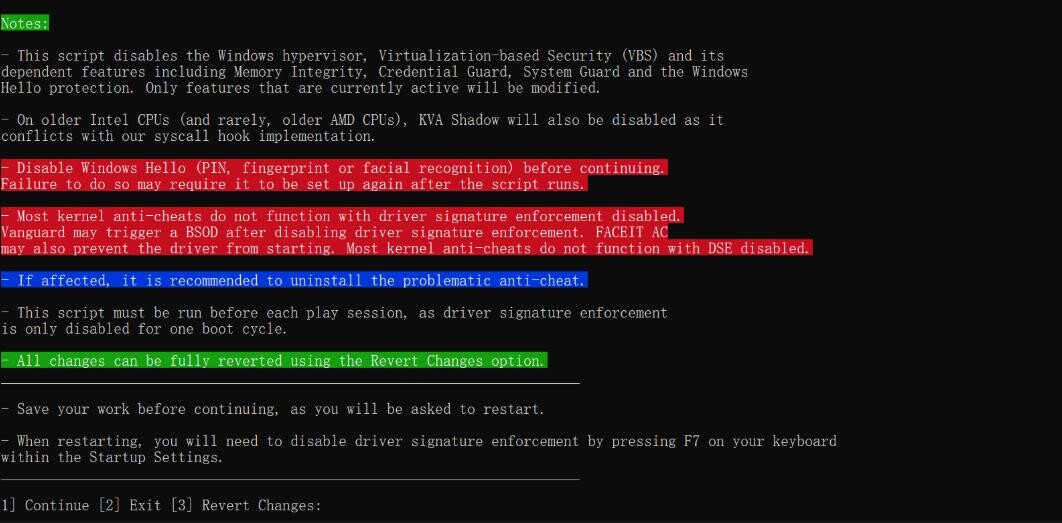
Notes:
– This script disables the Windows hypervisor, Virtualization-based Security (VBS) and its dependent features including Memory Integrity, Credential Guard, System Guard and the Windows Hello protection. Only features that are currently active will be modified.
– On older Intel CPUs (and rarely, older AMD CPUs), KVA Shadow will also be disabled as it conflicts with our syscall hook implementation.
– Disable Windows Hello (PIN, fingerprint or facial recognition) before continuing. Failure to do so may require it to be set up again after the script runs.
– Most kernel anti-cheats do not function with driver signature enforcement disabled. Vanguard may trigger a BSOD after disabling driver signature enforcement. FACEIT AC may also prevent the driver from starting. Most kernel anti-cheats do not function with DSE disabled. – If affected, it is recommended to uninstall the problematic anti-cheat.
– This script must be run before each play session, as driver signature enforcement is only disabled for one boot cycle. – All changes can be fully reverted using the Revert Changes option.
– Save your work before continuing, as you will be asked to restart. – When restarting, you will need to disable driver signature enforcement by pressing F7 on your keyboard within the Startup Settings.
[1] Continue [2] Exit [3] Revert Changes:
-
此脚本将禁用 Windows 虚拟机监控程序、基于虚拟化的安全(VBS)及其依赖功能,包括内存完整性、凭据防护、系统防护和 Windows Hello 保护。仅会修改当前处于启用状态的功能。
-
在较旧的 Intel CPU(以及极少数较旧的 AMD CPU)上,KVA Shadow 也将被禁用,因为它与我们的系统调用钩子实现存在冲突。
-
继续操作前,请先禁用 Windows Hello(PIN、指纹或面部识别)。
若未执行此操作,脚本运行后可能需要重新设置 Windows Hello。
-
大多数内核级反作弊系统在驱动签名强制被禁用后将无法正常工作。
禁用驱动签名强制后,Vanguard 可能会触发蓝屏死机(BSOD),FACEIT AC 也可能阻止驱动启动。大多数内核级反作弊系统在 DSE(驱动签名强制)被禁用时无法运行。
-
若受到影响,建议卸载存在问题的反作弊程序。
-
每次游戏前都必须运行此脚本,因为驱动签名强制仅在单次开机周期内被禁用。
-
所有更改均可通过「还原更改」选项完全恢复。
-
继续操作前请保存所有工作,因为系统将要求你重启。
-
重启时,你需要在启动设置界面按下键盘 F7 来禁用驱动签名强制。
-
游戏前:
- 先按提示关闭 Windows Hello(PIN / 指纹 / 面部识别),避免设置丢失。
- 保存所有未完成的工作,因为执行后会要求重启。
- 按
1→ 回车,执行脚本。 - 重启时在「启动设置」界面按 F7 禁用驱动签名强制。
- 重启后以管理员身份运行
gamehypervisor-launcher.exe启动游戏。
-
游戏后:
- 运行
VBS.cmd,按3→ 回车,选择「还原更改」,恢复系统安全功能。 - 重启电脑,让设置生效。
- 运行
重要风险提示:
- 反兼容性问题:禁用驱动签名强制后,Vanguard、FACEIT AC 等内核级反作弊会失效甚至导致蓝屏,玩这类游戏前必须先还原更改。
- 单次生效:每次玩游戏都要重新执行脚本,因为驱动签名强制仅在单次开机周期内禁用。
- 安全风险:临时关闭 VBS / 内存完整性等功能会降低系统安全性,玩完后务必还原。
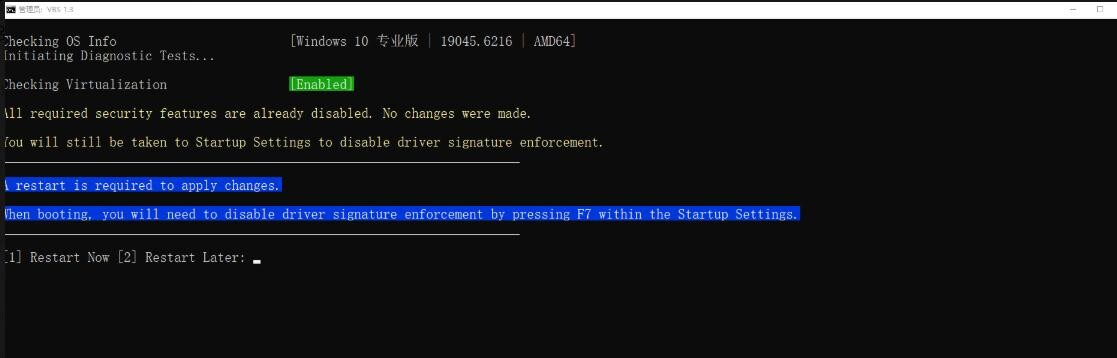
第四步:按[1]继续后,重启或者稍后手动重启。
Checking OS Info [Windows 10 专业版 | 19045.6216 | AMD64]
Initiating Diagnostic Tests…
Checking Virtualization [Enabled]
All required security features are already disabled. No changes were made.
You will still be taken to Startup Settings to disable driver signature enforcement. ————————————————————————————
A restart is required to apply changes.
When booting, you will need to disable driver signature enforcement by pressing F7 within the Startup Settings.
————————————————————————————
[1] Restart Now [2] Restart Later:
正在检查操作系统信息 [Windows 10 专业版 | 19045.6216 | 64位]
正在启动诊断测试…
正在检查虚拟化状态 [已启用]
所有需要的安全功能已处于禁用状态,未进行任何修改。
你仍将进入启动设置界面以禁用驱动签名强制。
————————————————————————————
需要重启以应用更改。
启动时,你需要在启动设置界面按下 F7 键来禁用驱动签名强制。
————————————————————————————
[1] 立即重启 [2] 稍后重启:
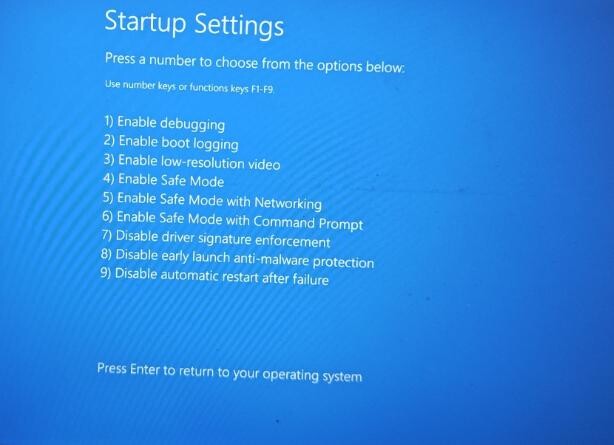
第五步:重启界面,选择F7进入
Startup Settings
Press a number to choose from the options below:
Use number keys or functions keys F1-F9.
1) Enable debugging
2) Enable boot logging
3) Enable low-resolution video
4) Enable Safe Mode
5) Enable Safe Mode with Networking
6) Enable Safe Mode with Command Prompt
7) Disable driver signature enforcement
8) Disable early launch anti-malware protection
9) Disable automatic restart after failure
Press Enter to return to your operating system
可使用数字键或功能键 F1-F9。
- 启用调试模式
- 启用启动日志
- 启用低分辨率视频
- 启用安全模式
- 启用带网络连接的安全模式
- 启用带命令提示符的安全模式
- 禁用驱动签名强制
- 禁用早期启动反恶意软件保护
- 禁用系统失败后自动重启
关键提示
- 务必提前 禁用 Windows Hello(PIN、指纹或面部识别),并注意内核反作弊游戏的兼容性问题。
- 所有修改都可以通过运行VBS.cmd文件后,选择选项
[3] Revert Changes恢复 - 每次游戏前都必须运行此脚本,因为驱动签名强制仅在单次开机周期内被禁用。
磁力:magnet:?xt=urn:btih:8bd12a83df7382e1a4676580a5d395f448304ad2
度盘:通过网盘分享的文件:Football.Manager.26.rar 链接: https://pan.baidu.com/s/1ZnSZ6t4AFUjbKu9yeXPkpw 提取码: 7gyy